November 18, 2026
BlogCompass Point: Microsoft Ignite Takeaways — What Enterprises Need to Know


Welcome to our latest installment of the monthly Directions on Microsoft Compass Point report, where we look ahead at emerging Microsoft technologies and product strategies that may impact your operations in the future. In this special issue, we’ve got your Cliff Notes for five of the most important enterprise announcements from the Microsoft Ignite conference, which kicked off on Nov. 17.
What’s Here, What’s Next for Copilot
Quick Take: Microsoft is adding a “Workspaces” feature, launching new Dynamics 365 plug-ins, and hinting that more vertical skills are coming to the Copilot “super app.”
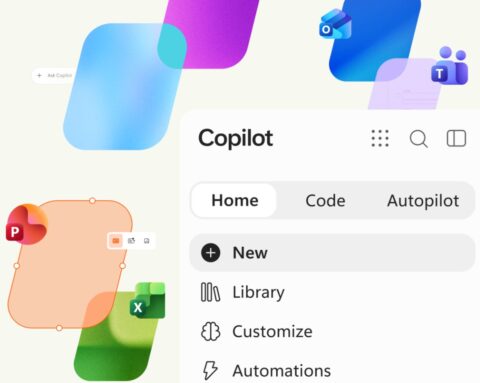
Microsoft is continuing to bang the “Copilot is the new operating system for work” drum. In keeping with this metaphor, the new Copilot “super app” that it announced in Sept. 2026 is becoming the front end/UI not only for Copilot itself, but for Microsoft, third-party, and customer-built apps and agents.
Microsoft is expanding the Home (Chat and Cowork), Code, and Autopilot tabs by adding a Copilot Workspaces one. Workspaces — which is the successor to Copilot Notebooks — is a shared canvas for people and agents to work together. It is coming to early “frontier” testers this week.
The previously announced “Today” feed, which shows Copilot users at a glance what is happening across email, calendar, Teams, meetings, and tasks, is starting to roll out in private preview across the Copilot app and Outlook. The Autopilot personal agent (formerly known as “Scout”) is rolling out to customers in Frontier starting this week, as well.
Microsoft also announced “Copilotforce,” a new branded partnership with CRM rival Salesforce. The two plan integrations across Copilot, Teams, and Fabric. At the same time, Microsoft announced officially “Dynamics 365 in Copilot,” which brings updated plug-ins for Dynamics 365 Sales, Serve, and Finance and Operations into Copilot.
Microsoft also plans to add more vertically focused plug-ins to Copilot, making it more tailored to specific roles, as it already has done with legal and finance.
Microsoft Office vs. the Office Newcomers
Quick Take: With Anthropic and OpenAI extending their core AI models with productivity tools, Microsoft is pitching the inclusion of key Office “experiences” in Copilot as a way for customers to save money.
Earlier this month, Anthropic announced its own suite of workplace productivity tools — Claude Sheets, Meetings, Whiteboards, and Data — that some believe could directly challenge Microsoft and Google.
These kinds of tools from Anthropic (and similar ones from OpenAI) are not as fully featured and well established as Microsoft Office. But Microsoft still is taking the possible threat head-on by bundling the “full power” of Word, Excel, and PowerPoint into the new Copilot super app and making them available as part of the base $30 per user per month M365 Copilot subscription. (In case you missed it, as of Dec. 1, 2026, Microsoft will make available to commercial customers for that $30/user/month price Microsoft 365 Copilot without the previous prerequisite of a qualifying M365 subscription.) Microsoft is touting the ability to use its core productivity features inside Copilot as a way to avoid having to spin up cloud AI meters.
“Anything you can do in Claude or ChatGPT, you can do better with Copilot and for less,” said Judson Althoff, CEO of Microsoft’s commercial business, during the opening Ignite keynote.
Microsoft’s existing standalone Office apps (which also offer Copilot inside of them) will continue to exist for those who want and need all the features. Office users will have (some potentially confusing) options: Office in Copilot, Copilot in Office, or both.
Fighting Fire with Fire: Perception Agent Security Platform
Quick Take: Defending against AI by using agents–that is how Microsoft’s Perception platform is designed. Microsoft has declared Perception generally available even as new pieces continue to trickle in.
Microsoft’s agentic security platform, Perception, is now generally available. Originally announced in July 2026, Perception uses agents and agent workflows to handle security tasks, especially those involving AI and agents.
At Ignite, Microsoft announced some new Perception capabilities, including broader capabilities for its Triage and Investigation Agents; expanded support for third-party data from AWS, Salesforce, Okta, and others; a new detection playbook (along with new capabilities for other playbooks); agentic risk prioritization; and more. The company also announced the updated MAI Cyber Flash 2 model, which is at the heart of Perception and the MDASH harness.
Microsoft is calling Perception an “API-first” security platform, meaning customers can opt to run Perception from tools they already use with a combination of APIs and MCP servers.
As noted in a recent Directions report, agentic AI remains problematic from a governance and security perspective. Perception is meant to help alleviate some of these concerns, as is Agent 365. A new Agent 365 Business Analytics capability is now in Frontier Preview. The analytics feature is meant to give business and security leaders better information on where AI spend and investments can be optimized.
Microsoft IQ = Your IQ?
Quick Take: Microsoft’s collection of intelligence platforms across Office, Fabric, Foundry, and the web might end up being its secret weapon, especially if customers use them to customize their own AI platforms.
Microsoft IQ is the set of Microsoft “intelligence platforms” that it has built around some of its core platforms. At Ignite, officials played up how the collection of Work IQ, Foundry IQ, Fabric IQ, and Web IQ can act as an enterprise context management platform for customers who are willing to use it to build out their own knowledge management (KM) platforms upon which agents can draw. Microsoft highlighted as an example “Unilever IQ,” as a KM platform that Unilever can use to compound its own intelligence without having to give away its intellectual property to AI vendors like Microsoft.
Microsoft has been working on solutions to the KM challenge for years with SharePoint, its FAST Search & Transfer enterprise search, Yammer, Delve, “Project Cortex” and Viva Topics. Its latest attempt builds on Copilot, agents, and Foundry.
At Ignite, Microsoft announced new business plug-ins for Microsoft IQ for those in the Frontier test program, that are meant to make reuse of enterprise building blocks easier. These plug-ins can give agents insight into context, tools, skills, and authoritative sources to help companies build up their institutional knowledge, while requiring fewer tokens, according to Microsoft.
Be warned: Microsoft IQ is not cheap, as Directions has noted, especially when multiple IQ services are used together across Azure, Fabric, and Microsoft 365.
Windows Server 2028 As Microsoft’s AI Server
Quick Take: Microsoft has been trying to position Windows client as the place to run AI locally; now it is doing the same with the coming Windows Server 2028 release.
We knew there would be another on-premises Windows Server release. And, indeed, Windows Server 2028, is now in public preview, with support for AMD’s Instinct MI350P accelerator for AI and high-performance workloads slated to arrive in preview in the first half of 2027.
As it has been trying to do with Windows client, Microsoft is positioning Server 2028 as a platform for locally running AI inference (not just traditional workloads). Microsoft says Server 2028 will support a local version of its Microsoft Foundry platform that provides a one-stop shop for agents, models, and tools; and Agent 365 for agent identity and governance. Some of these capabilities were previously touted for Azure Local, and adding then to Server 2028 will expand their potential audience. With Server 2028, native NVMe is enabled by default, and the awaited Boot-from ReFS feature will finally be included. Intune management for Windows Server is now in preview, as well, which may be the beginning of the end for the long-neglected System Center suite.
Got any Microsoft technologies or strategies on YOUR radar that you’d like to hear more about? Drop us a note at compasspoint@directionsonmicrosoft.com and we can try to find out more and share it here.